
Replication and cluster guide
This is the practical operator guide for NonoDB replication in 0.26.0 and
later. It covers a primary, read replicas, hot standby, quorum failover, the CLI,
the GUI Cluster view, monitoring, and the common failure modes.
The lower-level design and log format are described in Replication design.
Quick start: one primary code, one Docker replica
Section titled “Quick start: one primary code, one Docker replica”On the primary, generate a one-time pairing code with the CLI:
nonodb-cli replication add-replica replica-docker default# Pairing code: K7M4P9QX# On the replica, run:# nonodb-cli replication join http://10.0.0.10:7878 K7M4P9QXOn the client, prepare a Docker replica and redeem the code through its local daemon:
docker volume create nonodb-replica-datadocker volume create nonodb-replica-run
docker run --rm \  -v nonodb-replica-data:/var/lib/nonodb \  -e NONODB_AUTH_FILE=/var/lib/nonodb/auth.json \  ghcr.io/essmos/nonodb:0.26.0 \  nonodb-cli auth init
docker run -d --name nonodb-replica \  -p 7912:7878 \  -v nonodb-replica-data:/var/lib/nonodb \  -v nonodb-replica-run:/run/nonodb \  -e NONODB_AUTH_FILE=/var/lib/nonodb/auth.json \  -e NONODB_TCP=0.0.0.0:7878 \  -e NONODB_REPLICATION_ROLE=replica \  -e NONODB_REPLICATION_NODE_ID=replica-docker \  -e NONODB_REPLICATION_ADVERTISE_URL=http://10.0.0.3:7912 \  ghcr.io/essmos/nonodb:0.26.0
docker exec nonodb-replica nonodb-cli replication join \  http://10.0.0.10:7878 K7M4P9QX
docker exec nonodb-replica nonodb-cli replication status
The replica environment does not need NONODB_REPLICATION_SOURCE or
NONODB_REPLICATION_SOURCE_TOKEN; join installs them from the primary. Set
NONODB_REPLICATION_ADVERTISE_URL explicitly behind Docker, NAT, a reverse
proxy, or TLS termination. The detailed pairing flow is in
section 5.2, and Docker
is covered in section 5.8.
1. Concepts
Section titled “1. Concepts”| Term | Meaning |
|---|---|
| Primary | The only node that accepts client writes. It appends every committed write to the durable replication log. |
| Replica | Read-only node. It pulls changes from a source and applies them atomically. |
| Standby | A replica that is intended to become primary after a controlled failover. |
| Source | The URL a replica pulls from. A replica can also be a source for downstream replicas after promotion. |
| Origin | Stable identity of the writer. It is stored in every replication transaction. |
| Sequence | Monotonic transaction number in a database’s replication log. |
| Epoch | Fencing generation. A newer primary has a higher epoch; stale writers are rejected. |
| Head | Last replication transaction stored on a node. It is not a document count. |
| Applied | Last source transaction applied for one origin. |
| Lag | source_head - applied; zero means caught up. |
| Ack | A replica’s report that it applied up to a sequence. The primary uses acks for safe pruning. |
| Bootstrap | Initial snapshot copy used when a fresh replica joins or is too far behind. |
| Promotion ready | Replica has applied the last observed source head and control-plane snapshot and may be promoted automatically. |
| Control plane | Replicated auth registry, backup jobs/state, database catalog, and cluster peer token. |
| Dormant services | Backup scheduler, TTL, history pruning, subscriptions, and maintenance are loaded on replicas but only run on the primary. |
| Pairing code | Short-lived 8-character bootstrap secret used to enroll a new replica. |
Replication is pull-based:
replica ───── outbound pull ─────▶ primaryThe primary does not need to connect back to a replica.
2. What is replicated
Section titled “2. What is replicated”The ordered replication stream covers documents and the cluster control plane.
Data-plane operations:
- document
insert,update, anddelete; - atomic batch and SQL writes;
- TTL-expiry deletes;
- collection creation;
- TTL settings;
- per-collection history settings and generated history;
- automatic event settings;
- secondary, compound, geo, text, fuzzy, and vector indexes;
- conditional subscription definitions and renewals;
_eventsoutbox documents;- encrypted vault envelopes (the tenant key is supplied by clients).
Control-plane operations:
- the auth registry snapshot: principals, scopes, token hashes, and certificate fingerprints;
- backup job definitions and run state;
- the database catalog (
create_database/drop_database); - the cluster peer token.
Outbox documents and index definitions are applied in the same replication transaction as the data that produced them. Replicas build or backfill indexes locally and maintain them on subsequent applies.
Replicas apply the control plane immediately so every node has the same admin credentials, backup jobs, and catalog. Write-side services stay dormant until the node becomes primary.
Not replicated:
- vault keys: vault payloads are replicated as encrypted envelopes, but the tenant key is supplied by the client and is not stored by NonoDB;
- local backup artifacts — copy them to S3/R2, restic, or shared storage if the new primary must read them;
- node transport identity: bind address, data directory, socket path, and TLS server key;
- background job claims — workers must point at the primary or
write_url.
3. Topologies
Section titled “3. Topologies”3.1 One primary and one read replica
Section titled “3.1 One primary and one read replica”This is the simplest and recommended starting point:
primary ── async pull ──▶ replicaReplicas accept reads, aggregation, SQL SELECT, watch, and stream requests.
Client writes return HTTP 403 read_only.
3.2 Primary plus hot standby
Section titled “3.2 Primary plus hot standby”A hot standby is a replica that is allowed to become primary:
primary ──▶ standby │ └──────▶ read replicasPromotion requires a voter majority if voters are configured. A standby should
have NONODB_REPLICATION_AUTO_FAILOVER=1 and
NONODB_REPLICATION_CANDIDATE=1.
3.3 Quorum cluster
Section titled “3.3 Quorum cluster”For automatic failover, configure at least three voters:
primary ├── candidate1 ├── candidate2 ├── candidate3 └── candidate4Five voters survive two simultaneous voter failures; three voters survive one. Non-voting followers receive the new primary URL after an election.
4. Requirements
Section titled “4. Requirements”- Every node runs the same NonoDB release.
- Every node has a separate
NONODB_DATAdirectory. - Replica can reach the source URL outbound.
- The source token must have
admin:dbor*:*; the replication admin API currently has no narrower scope. - Use TLS/mTLS when nodes communicate over an untrusted network.
- Allow enough disk for the database, replication log, and a temporary snapshot.
- Keep clocks synchronized (NTP) for lease and subscription expiry semantics.
4.1 Install and start NonoDB from scratch
Section titled “4.1 Install and start NonoDB from scratch”Install the released binaries on every node (see Operations for the full systemd and Docker variants):
TAG=v0.26.0ARCHIVE="nonodb-$TAG-linux-x86_64.tar.gz"curl -LO "https://github.com/essmos/nonodb/releases/download/$TAG/$ARCHIVE"curl -LO "https://github.com/essmos/nonodb/releases/download/$TAG/$ARCHIVE.sha256"sha256sum -c "$ARCHIVE.sha256"tar -xzf "$ARCHIVE"sudo install -m 0755 "nonodb-$TAG-linux-x86_64/nonodb-daemon" /usr/local/bin/sudo install -m 0755 "nonodb-$TAG-linux-x86_64/nonodb-cli" /usr/local/bin/
sudo useradd --system --home /var/lib/nonodb --shell /usr/sbin/nologin nonodbsudo install -d -o nonodb -g nonodb /var/lib/nonodb /run/nonodbsudo install -d -m 0750 -o nonodb -g nonodb /etc/nonodb
Create the auth registry before starting a TCP listener:
sudo -u nonodb env NONODB_AUTH_FILE=/etc/nonodb/auth.json nonodb-cli auth initsudo -u nonodb env NONODB_AUTH_FILE=/etc/nonodb/auth.json nonodb-cli auth token create adminSave the printed token in a secret manager or a root-owned 0600 environment
file. Start the daemon in the foreground for a first test:
sudo -u nonodb env \ NONODB_DATA=/var/lib/nonodb \ NONODB_AUTH_FILE=/etc/nonodb/auth.json \ NONODB_TCP=0.0.0.0:7878 \ NONODB_REPLICATION_ENABLED=1 \ NONODB_REPLICATION_ORIGIN=primary-eu \ NONODB_REPLICATION_ADVERTISE_URL=https://primary.example.com:7878 \ nonodb-daemonFor a service, install deploy/nonodb.service, put the same variables in an
EnvironmentFile, then run systemctl enable --now nonodb. The GUI is a
separate nonodb-cli gui process; it is not served by the daemon. See
GUI guide.
4.2 How a replica finds the primary after a failover
Section titled “4.2 How a replica finds the primary after a failover”The source URL is not the only copy of the topology. Every node persists its current source in the hidden node metadata collection. Rediscovery works in three layers:
- Normal source switch: when the stored source is alive but has been
demoted, its
/v1/replication/statusreturnssuccessor. The replica switches immediately. - Source is unreachable: after three failed pull cycles the replica queries
NONODB_REPLICATION_SEEDS, then the configured voters and followers, atGET /v1/replication/primary. The first node that reportsrole=primarybecomes the new source. - No local source at all: a replica or replacement node with no source configuration also uses the seed/voter list to join the current primary automatically.
A replica that was offline for a long time therefore needs at least one stable address that still exists. Use DNS names, a load balancer, or a small seed list; a fixed IP of a node that no longer exists cannot be rediscovered.
# Stable discovery addresses, comma-separated. Include voters or a DNS name# that follows the current primary.NONODB_REPLICATION_SEEDS=https://db-1.example.com:7878,https://db-2.example.com:7878
# The source token is used for discovery when no voter/peer token is set.# Use the same cluster-admin credential for both.NONODB_REPLICATION_VOTER_TOKEN=<cluster-admin-token>
Prefer pairing for credentials: nonodb-cli replication join writes the source,
source token, selected databases, poll interval, batch size, and bootstrap mode
into the hidden collection. You do not need to copy those values into the
replica environment. Seeds are only addresses; they do not grant access.
4.3 Where replication state is stored
Section titled “4.3 Where replication state is stored”Replication role, source, vote, lease, and cluster peer token are stored in the
hidden LMDB system collection <NONODB_DATA>/.node (sub-database meta). They
are node-local, atomic, and never copied into database snapshots. Legacy
replication-role.json, replication-source.json, replication-vote.json,
replication-lease.json, and cluster-peer-token files from older versions
are imported once and removed. Back up NONODB_DATA, but do not copy .node
to another node: it identifies this node’s role and current source.
5. Quick start: existing database becomes primary
Section titled “5. Quick start: existing database becomes primary”Suppose the existing database is on primary.example.com and the new replica
runs on replica.example.com.
5.1 Primary environment
Section titled “5.1 Primary environment”NONODB_DATA=/var/lib/nonodbNONODB_TCP=0.0.0.0:7878NONODB_AUTH_FILE=/etc/nonodb/auth.json
NONODB_REPLICATION_ENABLED=1NONODB_REPLICATION_ORIGIN=primary-euNONODB_REPLICATION_ROLE=primaryNONODB_REPLICATION_NODE_ID=primary-euNONODB_REPLICATION_ADVERTISE_URL=https://primary.example.com:7878The origin must be unique and must never change after the node starts
replicating. The role is persisted in the hidden node metadata collection
<NONODB_DATA>/.node; after the first start it wins over
NONODB_REPLICATION_ROLE.
5.2 Preferred: create the replica with a pairing code
Section titled “5.2 Preferred: create the replica with a pairing code”Pairing is the supported onboarding flow. The primary creates a one-time code;
the replica redeems it and receives its source, token, database selection,
poll interval, batch size, bootstrap mode, and the full control-plane snapshot.
Do not copy NONODB_REPLICATION_SOURCE or NONODB_REPLICATION_SOURCE_TOKEN into
the replica environment when you use pairing.
On the primary:
nonodb-cli replication add-replica replica-eu defaultpair is an alias for the same command. It prints an 8-character code such as
K7M4P9QX, valid for 10 minutes, plus the exact join command. You can also use
GUI → Replication → Add replica.
On the new replica, start the daemon first with an empty data directory, its own
NONODB_AUTH_FILE, and the initial replica role. Then run join against the
local daemon socket:
export NONODB_AUTH_FILE=/etc/nonodb/replica-auth.jsonexport NONODB_SOCK=/run/nonodb-replica.socknonodb-cli replication join https://primary.example.com:7878 K7M4P9QXThe code can be passed as the third argument or entered when prompted. The local daemon:
- redeems the code on the primary;
- installs the returned source, token, databases, poll interval, batch size, and bootstrap mode in the hidden node metadata collection;
- demotes itself to a read-only replica if it was a writer;
- applies the primary auth registry, backup configuration, and database catalog through the control plane;
- starts pulling data.
The old local replica admin token is replaced by the replicated cluster auth registry. Use the primary’s cluster admin token from then on.
Pairing installs these settings on the replica:
Installed by join |
Still configured locally |
|---|---|
| source URL | data directory |
| source token | auth file |
| initial database list | TCP bind and TLS server identity |
| poll interval | initial role on first start |
| batch size | node id |
| bootstrap mode | advertised replication URL |
The code is single-use, expires after 10 minutes, and is rate-limited. It is an 8-character code from an unambiguous 32-character alphabet, not 8 digits.
5.3 Legacy manual source configuration
Section titled “5.3 Legacy manual source configuration”Use this only when pairing is not available. It does not install the control plane automatically and is not the recommended path.
You can still provision a token manually:
export NONODB_AUTH_FILE=/etc/nonodb/auth.json
nonodb-cli auth principal add replication admin:dbnonodb-cli auth token create replication
Store the printed token in a secret manager or a 0600 environment file. Set
the source and token explicitly on the replica:
NONODB_REPLICATION_SOURCE=https://primary.example.com:7878NONODB_REPLICATION_SOURCE_TOKEN=__REPLICATION_TOKEN__NONODB_REPLICATION_DATABASES=defaultA later replication join overwrites these values with the values returned by
the primary.
5.4 Open the network path
Section titled “5.4 Open the network path”Allow the replica IP to reach port 7878 on the primary. Prefer one of:
- a private network or WireGuard;
- TLS on the daemon;
- mTLS with a private CA.
Do not expose plaintext replication to the public internet.
5.5 Replica environment
Section titled “5.5 Replica environment”Use a new, empty data directory. With pairing, the replica environment only needs node-local transport settings:
NONODB_DATA=/var/lib/nonodb-replicaNONODB_TCP=0.0.0.0:7878NONODB_AUTH_FILE=/etc/nonodb/replica-auth.json
# Initial role only. The role is persisted in .node after the first start.NONODB_REPLICATION_ROLE=replicaNONODB_REPLICATION_NODE_ID=replica-eu
# Optional. Auto-detected on a flat LAN when unset.NONODB_REPLICATION_ADVERTISE_URL=https://replica.example.com:7878
Do not set NONODB_REPLICATION_SOURCE,
NONODB_REPLICATION_SOURCE_TOKEN, or NONODB_REPLICATION_DATABASES for a
paired replica. replication join installs them from the pairing response.
Create a local auth file before starting the replica daemon:
export NONODB_AUTH_FILE=/etc/nonodb/replica-auth.jsonnonodb-cli auth initDo not copy the primary’s auth registry unless you intentionally want the same tokens on both nodes; pairing applies the replicated registry after join.
NONODB_REPLICATION_BATCH is selected by the primary and copied into the
pairing response. Set it on the primary before creating the pairing code when
the source has very large transactions:
# On the primary, before creating the pairing code.NONODB_REPLICATION_BATCH=20The older default of 500 can make a /v1/replication/changes response very
large when a single write transaction contains many documents.
5.6 Start and verify
Section titled “5.6 Start and verify”Start the primary first, then the replica. On the replica, run join only after
the local daemon is listening on its socket:
export NONODB_SOCK=/run/nonodb.sock
nonodb-cli replication join https://primary.example.com:7878 K7M4P9QXnonodb-cli replication statusnonodb-cli replication changes 0 5nonodb-cli replication acksnonodb-cli ready
The join command prints the installed source, node id, databases, and first
pull result. Expected status:
{ "role": "replica", "read_only": true, "promotion_ready": true, "replication": { "source": "https://primary.example.com:7878", "bootstrap": "auto", "interval_secs": 1 }}Reads work:
nonodb-cli find orders '{}'nonodb-cli count orders '{}'Writes are rejected:
{ "code": "read_only", "message": "replica is read-only; promote this node before accepting writes"}The first start downloads a full snapshot when the local database is fresh. Large databases can take a long time and require temporary disk space.
5.7 Reversed direction
Section titled “5.7 Reversed direction”If the remote server must be primary, do not reverse any local source settings: create the pairing code on the remote primary and redeem it from the local replica.
remote server = primary, accepts writeslocal server = replica, pulls from the remote primaryStart the local daemon with NONODB_REPLICATION_ROLE=replica and its own auth
file, then run:
nonodb-cli replication join https://remote-primary:7878 <pairing-code>join installs the source URL, token, databases, interval, batch, and bootstrap
mode. You do not set NONODB_REPLICATION_SOURCE manually for a paired replica.
5.8 Docker replica
Section titled “5.8 Docker replica”For Docker, publish the replica API on a host port and set
NONODB_REPLICATION_ADVERTISE_URL to the Docker host’s LAN address. Do not
advertise the container’s 172.x address; Docker NAT also prevents the
automatic LAN fallback.
docker volume create nonodb-replica-datadocker volume create nonodb-replica-run
docker run --rm \  -v nonodb-replica-data:/var/lib/nonodb \  -e NONODB_AUTH_FILE=/var/lib/nonodb/auth.json \  ghcr.io/essmos/nonodb:0.26.0 \  nonodb-cli auth init
docker run -d --name nonodb-replica \  -p 7912:7878 \  -v nonodb-replica-data:/var/lib/nonodb \  -v nonodb-replica-run:/run/nonodb \  -e NONODB_AUTH_FILE=/var/lib/nonodb/auth.json \  -e NONODB_TCP=0.0.0.0:7878 \  -e NONODB_REPLICATION_ROLE=replica \  -e NONODB_REPLICATION_NODE_ID=replica-docker \  -e NONODB_REPLICATION_ADVERTISE_URL=http://DOCKER_HOST_IP:7912 \  ghcr.io/essmos/nonodb:0.26.0
docker exec nonodb-replica nonodb-cli replication join \  http://PRIMARY_HOST:7878 PAIRING-CODE
docker exec nonodb-replica nonodb-cli replication status
Replace DOCKER_HOST_IP with the Docker host’s LAN address,
PRIMARY_HOST with the primary’s daemon API host (not the GUI proxy), and
PAIRING-CODE with the code created on the primary. The join command runs
inside the container because it talks to the local daemon socket. See
GUI guide for the same steps in the GUI.
6. TLS and mTLS
Section titled “6. TLS and mTLS”6.1 Server TLS on the primary
Section titled “6.1 Server TLS on the primary”NONODB_TLS_CERT=/etc/nonodb/tls/server.crtNONODB_TLS_KEY=/etc/nonodb/tls/server.key6.2 mTLS on the primary
Section titled “6.2 mTLS on the primary”NONODB_TLS_CERT=/etc/nonodb/tls/server.crtNONODB_TLS_KEY=/etc/nonodb/tls/server.keyNONODB_TLS_CLIENT_CA=/etc/nonodb/tls/client-ca.crtNONODB_TLS_CLIENT_AUTH=required6.3 Replica client settings
Section titled “6.3 Replica client settings”The source URL and token are installed by replication join. Only the TLS
client material is configured locally:
NONODB_REPLICATION_CA_FILE=/etc/nonodb/tls/ca.crtNONODB_REPLICATION_CERT_FILE=/etc/nonodb/tls/replica.crtNONODB_REPLICATION_KEY_FILE=/etc/nonodb/tls/replica.keyWhen the client certificate is registered as an admin:db principal, the source
token can be omitted. See Mutual TLS.
TLS server certificates and the client CA are reloaded without restarting:
NONODB_TLS_RELOAD_INTERVAL=307. CLI reference
Section titled “7. CLI reference”Run against the local daemon using NONODB_SOCK, or use the GUI/API over TCP.
nonodb-cli replication statusnonodb-cli replication primarynonodb-cli replication changes 0 100nonodb-cli replication acksnonodb-cli replication source https://primary.example.com:7878 default,app1 1nonodb-cli replication prune 1234 --require-acksnonodb-cli replication promote <epoch>nonodb-cli replication demote <epoch> replica [successor-url]nonodb-cli instancesnonodb-cli --instance <pid|node_id> replication statusnonodb-cli --socket /run/nonodb-replica.sock replication status| Command | Purpose |
|---|---|
status |
Role, epoch, head, write URL, source, bootstrap, applied sources, lag, acks, errors, promotion_ready. |
primary |
Current write endpoint and role. Useful for load balancers and scripts. |
changes [after] [limit] |
Read the durable replication log. Use an after checkpoint for consumers. |
acks |
Replica acknowledgement sequences and ages. |
source <url> [dbs] [interval] |
Change the pull source without restarting. |
pause |
Stop pulling/applying while keeping the source and token. |
resume |
Resume a paused replica from the stored source. |
disconnect |
Remove source/token and leave the node read-only; data is kept. |
forget <node> |
Remove the ACK row and block that node id until re-paired. |
prune <seq> [--require-acks] |
Remove old log records, optionally refusing to pass the minimum ack. |
add-replica <name> [dbs] (alias pair) |
Create a one-time 8-character pairing code on the primary. |
pairings |
List pending pairing codes. |
revoke <code> |
Revoke a pending pairing code. |
join <primary-url> [code] |
Redeem a code on the replica and install the source/control plane. |
promote <epoch> |
Manual promotion. Requires the expected epoch. |
demote <epoch> replica [successor] |
Manual demotion, optionally advertising a successor. |
instances |
List registered local daemons with node id, role, socket, TCP, advertise URL, and data directory. |
--instance <pid|node_id> |
Send a CLI command to a specific registered daemon. |
--socket <path> |
Send a CLI command to a specific daemon socket. |
The CLI does not configure voters, followers, leases, candidate priorities, TLS paths, or retention. Those are startup environment settings.
7.1 Environment reference
Section titled “7.1 Environment reference”| Variable | Default | Meaning |
|---|---|---|
NONODB_REPLICATION_ENABLED |
0 |
Enable durable log capture on a writer. |
NONODB_REPLICATION_ORIGIN |
node id / local |
Stable writer identity. |
NONODB_REPLICATION_ROLE |
primary |
Seeds the hidden role state on first start: primary, replica, or standby. Pairing demotes a writer to replica. |
NONODB_REPLICATION_NODE_ID |
node id / local |
Replica identity used in acks. |
NONODB_REPLICATION_SOURCE |
unset | Source base URL. Legacy manual configuration; join installs it automatically. |
NONODB_REPLICATION_SOURCE_TOKEN |
unset | Bearer token for source replication API. Legacy manual configuration; join installs it automatically. |
NONODB_REPLICATION_DATABASES |
default |
Comma-separated databases to pull. Legacy manual configuration; pairing selects them on the primary. |
NONODB_REPLICATION_POLL_INTERVAL |
1 |
Seconds between pulls. |
NONODB_REPLICATION_BATCH |
500 |
Transactions per /changes request, clamped to 1–1000. Pairing copies the primary’s value to the replica. |
NONODB_REPLICATION_BOOTSTRAP |
auto |
auto, always, or never. |
NONODB_REPLICATION_EXIT_ON_GAP |
0 |
Ask the supervisor to restart on a runtime gap so startup can resync. |
NONODB_REPLICATION_ADVERTISE_URL |
unset | Public URL used for write routing and promotion. Replicas auto-detect a LAN URL from the actual TCP listener or NONODB_TCP and the route to the primary when unset. |
NONODB_REPLICATION_VOTERS |
unset | Comma-separated voter URLs. Empty disables quorum and leases. |
NONODB_REPLICATION_VOTER_TOKEN |
unset | Shared token used to call voter endpoints. |
NONODB_REPLICATION_FOLLOWERS |
unset | Non-voting nodes that receive the new primary URL. |
NONODB_REPLICATION_SEEDS |
unset | Stable addresses queried to rediscover the primary when the stored source is unreachable. |
NONODB_REPLICATION_LEASE_INTERVAL |
5 |
Primary quorum lease renewal interval. |
NONODB_REPLICATION_LEASE_TTL |
15 |
Time without majority before a primary self-demotes. |
NONODB_REPLICATION_AUTO_FAILOVER |
0 |
Enable candidate election. |
NONODB_REPLICATION_CANDIDATE |
0 |
Mark this node as an election candidate. |
NONODB_REPLICATION_CANDIDATE_PRIORITY |
0 |
Extra seconds before campaigning; lower is preferred. |
NONODB_REPLICATION_ELECTION_INTERVAL |
5 |
Candidate polling interval. |
NONODB_REPLICATION_FAILOVER_TIMEOUT |
30 |
Source failure duration before election starts. |
NONODB_REPLICATION_PRUNE_INTERVAL |
0 |
Automatic retention interval. |
NONODB_REPLICATION_RETENTION_KEEP |
0 |
Extra sequences kept behind the minimum ack. |
NONODB_REPLICATION_CA_FILE |
unset | CA bundle for source TLS. |
NONODB_REPLICATION_CERT_FILE |
unset | Client certificate for source mTLS. |
NONODB_REPLICATION_KEY_FILE |
unset | Client private key. |
NONODB_CLUSTER_PRUNE_DATABASES |
1 |
Drop local non-default databases that disappear from the replicated catalog. Set 0 to keep them. |
NONODB_INSTANCE_DIR |
platform runtime dir | Per-user instance registry directory used by nonodb-cli instances. |
8. Quorum and failover
Section titled “8. Quorum and failover”8.1 Voter configuration
Section titled “8.1 Voter configuration”Use an odd number of voters, normally three or five:
NONODB_REPLICATION_VOTERS=https://primary:7878,https://candidate1:7878,https://candidate2:7878NONODB_REPLICATION_VOTER_TOKEN=__SHARED_ADMIN_TOKEN__Set the same voter list on every voter. Set NONODB_REPLICATION_ADVERTISE_URL
on every node.
8.2 Lease-gated writes
Section titled “8.2 Lease-gated writes”The primary renews a quorum lease. Client writes are accepted only when the
node is both primary and holds a valid lease. A primary with configured voters
starts read-only; it does not accept writes until it reaches a voter majority.
If it loses the voter majority for NONODB_REPLICATION_LEASE_TTL, it
self-demotes and becomes read-only. Automatic candidates also wait out the lease
TTL before campaigning, so a fast election cannot create two writers.
NONODB_REPLICATION_LEASE_INTERVAL=5NONODB_REPLICATION_LEASE_TTL=158.3 Candidates
Section titled “8.3 Candidates”On selected replicas:
NONODB_REPLICATION_AUTO_FAILOVER=1NONODB_REPLICATION_CANDIDATE=1NONODB_REPLICATION_CANDIDATE_PRIORITY=0NONODB_REPLICATION_ELECTION_INTERVAL=1NONODB_REPLICATION_FAILOVER_TIMEOUT=10Lower priority campaigns first. A higher priority waits longer, so the preferred candidate normally wins.
Automatic election requires promotion_ready=true: the candidate must have
applied the last observed source head and the replicated control-plane
snapshot. A lagging candidate waits instead of promoting stale data or missing
auth/backup configuration.
8.4 Write routing
Section titled “8.4 Write routing”The current write endpoint is exposed in:
GET /v1/replication/primaryGET /readyz/writeGET /readyz/write returns the write URL and readiness. A read-only node also
returns a Location header and error.write_url on rejected writes. The
official clients support write_url/auto_primary; see
Clients. Proxies can retry once
against the new primary.
Example load-balancer rule:
if path starts with /v1/exec and method is POST: follow /readyz/write retry once on 403 read_only using Location8.5 Manual failover
Section titled “8.5 Manual failover”For a controlled move:
- stop writes to the old primary;
- demote it:
nonodb-cli replication demote <epoch> replica https://new-primary:7878- promote the target:
nonodb-cli replication promote <epoch>- verify
replication status, lag, andwrite_url; - point clients at the new
write_url.
Without voters there is no quorum. Stop or demote the old primary before promoting a replica.
8.6 Returning old primary
Section titled “8.6 Returning old primary”When a partitioned primary loses its lease it self-demotes and becomes read-only. After connectivity returns, source discovery queries the voters for the current primary and installs it as the source. If the old log diverged, the replica resets its local replication state in place and re-pulls the source log; divergent local writes are discarded rather than merged. If the source log has already been pruned, the normal gap/snapshot recovery applies.
The network-partition test covers this path:
python3 scripts/replication_partition_test.pypython3 scripts/replication_vault_test.pyIt cuts a live primary from voters and replicas, verifies it self-demotes and rejects writes, waits for a new quorum primary, restores the links, and checks that the old primary rejoins as a read-only replica.
9. GUI guide
Section titled “9. GUI guide”The GUI has two relevant pages: Replication for the connected node and Cluster for all configured nodes.
9.1 Start the GUI
Section titled “9.1 Start the GUI”NONODB_TOKEN=<token> \NONODB_CLUSTER_TOKEN=<token> \nonodb-cli gui \ --host 10.0.0.10 \ --allow-remote \ --url http://127.0.0.1:7878 \ --cluster primary=https://primary.example.com:7878,replica=https://replica.example.com:7878--cluster accepts name=url,name=url. NONODB_CLUSTER_TOKEN is used for
remote probes; it falls back to NONODB_TOKEN.
Cluster probes currently require http:// URLs. Put HTTPS nodes behind a local
TLS-terminating proxy, or access them over a private network.
9.2 Add replica
Section titled “9.2 Add replica”The Replication page on a primary contains an Add replica panel:
- enter the replica name and initial databases;
- choose Create pairing code;
- copy the 8-character code, then on the new node start the daemon with an
empty data directory, its own
NONODB_AUTH_FILE, andNONODB_REPLICATION_ROLE=replica. Do not set source or source-token variables. Runnonodb-cli replication join <primary-api-url> <code>(or paste the code when prompted). Use the URL shown under Write URL (default daemon port7878; a customNONODB_TCPport is valid). Do not use the GUI proxy port (8787by default) —replication jointalks to the local daemon, and the local daemon contacts the primary; - the pending list shows unused codes and lets you revoke them.
If more than one daemon runs on the host, select the replica with
nonodb-cli --instance <pid|node_id> replication join ... or
nonodb-cli --socket <path> replication join .... See nonodb-cli instances.
Docker requires an explicit NONODB_REPLICATION_ADVERTISE_URL on a host port;
see Docker replica.

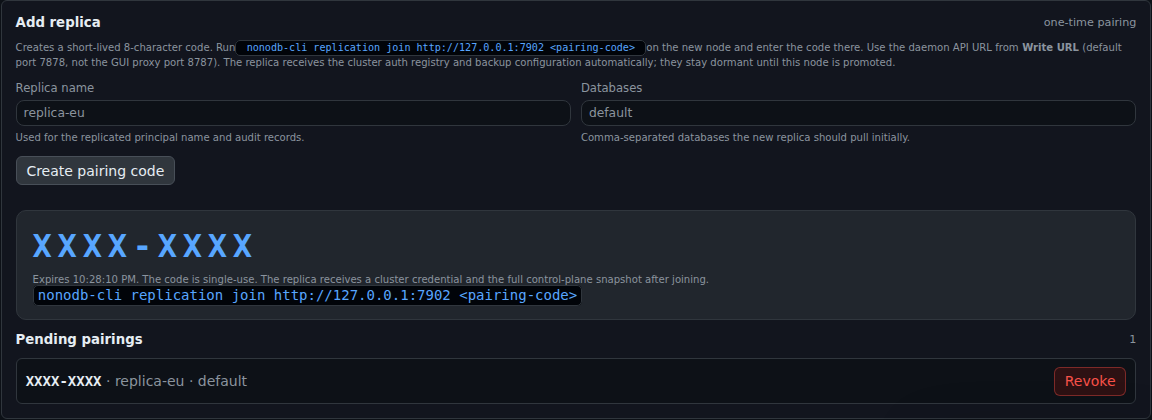
The replica receives the auth registry and backup configuration automatically. The control plane is dormant until the node is promoted.
9.3 Replication page
Section titled “9.3 Replication page”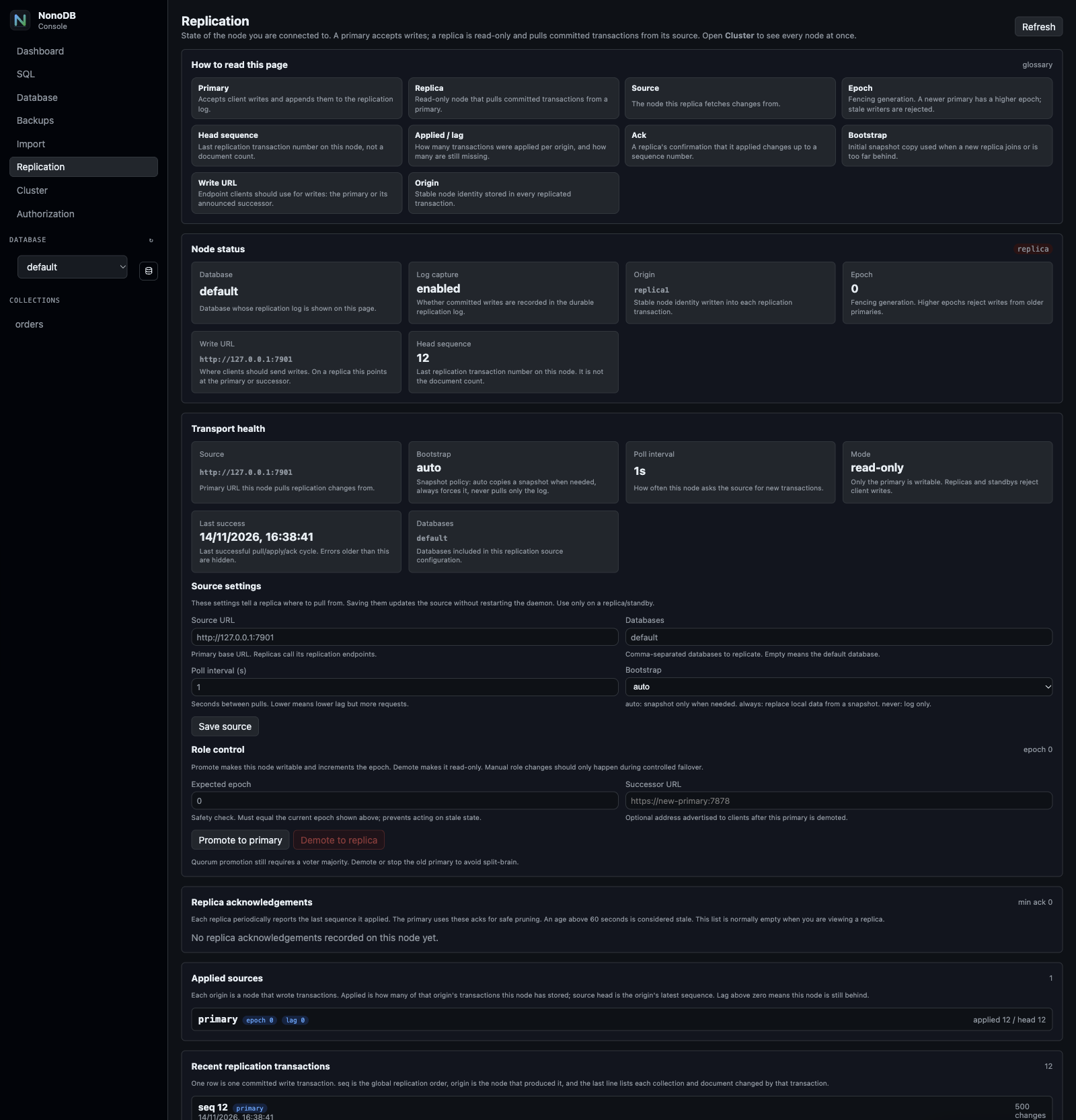
Use this page to inspect the node you are connected to:
- role, epoch, origin, write URL, head sequence;
- source, bootstrap mode, poll interval, read-only state;
- last successful pull;
- applied sources and lag;
- replica acknowledgements;
- source settings;
- manual promote/demote;
- recent replication transactions.
The page includes an inline glossary and a description under every field. On a primary, transport source fields are marked as not used while primary.
9.4 Cluster page
Section titled “9.4 Cluster page”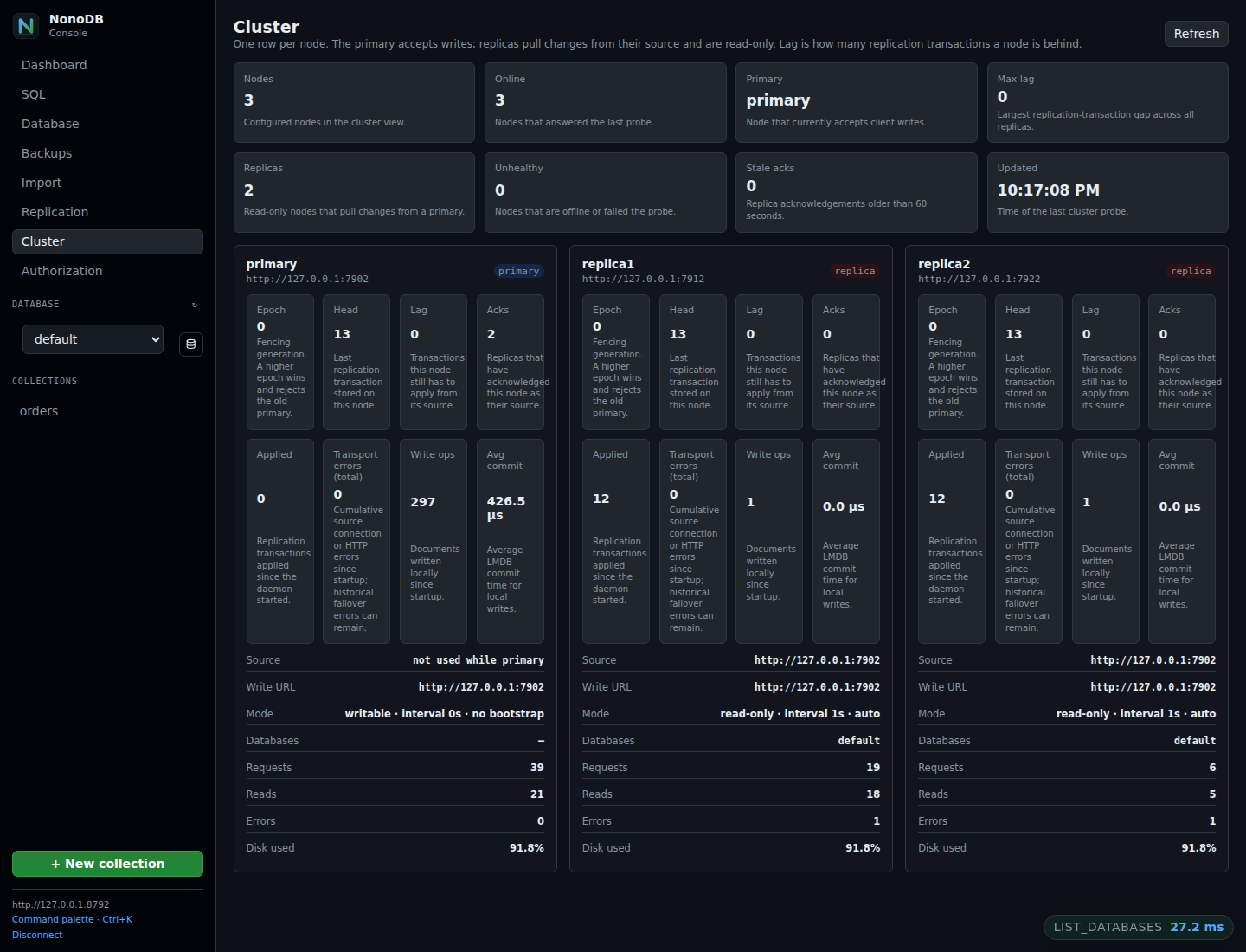
The screenshot shows a clean three-node demo cluster: one primary and two replicas, all online, with zero lag and two replica acknowledgements.
The Cluster tab probes every configured node in parallel and shows:
- node name and URL;
- role and epoch;
- head, lag, acks;
- applied transactions and transport errors;
- source and write URL;
- read-only/writable mode;
- requests, reads, writes, errors, disk use;
- offline nodes without blocking the rest of the view.
The view refreshes automatically. Unreachable nodes are shown as offline.
9.5 Live load test panel
Section titled “9.5 Live load test panel”When a benchmark is running and the GUI is started with
--progress-file <path> or NONODB_GUI_TEST_PROGRESS, the Cluster tab also
shows a Live load test panel with phase, loaded documents, percent, rate,
nodes online, writes, primary, and epoch.
9.6 Pause and disconnect
Section titled “9.6 Pause and disconnect”A replica or standby can be paused without losing its source:
nonodb-cli replication pausenonodb-cli replication resumedisconnect is stronger: it removes the source and token and leaves the node
read-only. It does not delete collections or history. Promote the node separately
if it should become standalone, and use a new pairing code to reconnect it later.
The Replication page exposes the same controls with confirmation.
After disconnecting, Remove replica on the primary deletes the ACK and blocks
that node id. A live replica gets 403 replica_removed until a new pairing code
is redeemed for the same id.
9.7 Network tab
Section titled “9.7 Network tab”A replica should set NONODB_REPLICATION_ADVERTISE_URL to an address reachable
from the primary/GUI host. The URL is carried in replication acknowledgements.
The primary stores it, and the GUI automatically probes advertised http://
replicas for full Cluster metrics. If the variable is unset, the daemon tries a
LAN fallback: it uses the local interface that routes to the primary and the
actual TCP listener (or NONODB_TCP). Set the variable explicitly behind NAT,
Docker, a reverse proxy, or a port forward. Without a usable URL, the replica still appears
through its ACK but only with node id, sequence, and freshness.
The Network tab contains the actual listener bind and the host firewall controls. This is where you verify that the primary is reachable before adding a remote replica:
- TCP bind must be
0.0.0.0or a LAN address, not127.0.0.1; - the advertised replication URL must be reachable from replicas;
- the managed nftables table can allow only selected source CIDRs on the NonoDB ports.
Firewall apply is opt-in with NONODB_FIREWALL_MANAGE=1; on a non-root service
use NONODB_FIREWALL_SUDO=1 with passwordless sudo. The managed table is
separate from SSH and general host policy. See Operations.
10. Monitoring
Section titled “10. Monitoring”Prometheus exposes replication metrics at /metrics/prometheus with a
metrics:read, admin:db, or *:* token. JSON metrics are also available at
/metrics.
Important metrics:
nonodb_replication_enablednonodb_replication_role{role="primary|replica|standby"}nonodb_replication_epochnonodb_replication_origin_info{origin="..."}nonodb_replication_head{database="..."}nonodb_replication_applied{database="...",origin="..."}nonodb_replication_applied_epoch{database="...",origin="..."}nonodb_replication_lag{database="...",origin="..."}nonodb_replication_ack_nodes{database="...",origin="..."}nonodb_replication_min_ack{database="...",origin="..."}nonodb_replication_ack_seq{database="...",origin="...",node="..."}nonodb_replication_ack_age_seconds{database="...",origin="...",node="..."}nonodb_replication_transport_errors_totalnonodb_replication_apply_errors_totalnonodb_replication_applied_totalnonodb_replication_pruned_totalnonodb_replication_retention_runs_totalRecommended alerts:
- no primary for more than N seconds;
- replica lag above policy;
- applied sequence stalled;
- apply error growth;
- stale replica acks;
- primary lease lost;
- TLS/mTLS handshake failures;
- log retention/disk pressure.
See Monitoring and Prometheus alerts.
11. Backup versus replication
Section titled “11. Backup versus replication”Replication is not a backup.
| Replication | Backup |
|---|---|
| Protects against node failure | Protects against data loss and logical mistakes |
| Async and continuous | Point-in-time snapshot |
| Replica is read-only | Restore creates a database/file |
Does not protect against DELETE replicated everywhere |
Restores from an earlier copy |
| Needs a network path and token | Can be local, S3, R2, or restic |
Keep both. Take regular snapshots even when a replica is healthy.
12. Troubleshooting
Section titled “12. Troubleshooting”| Symptom | Likely cause | Fix |
|---|---|---|
connect: No such file or directory on replication join |
Local replica daemon/socket is missing, or NONODB_SOCK is wrong |
Start the replica daemon and set NONODB_SOCK to its socket. join talks to the local daemon; the primary URL is only the source. On macOS/Linux use the Unix socket, not NONODB_URL. |
join connects to the wrong daemon |
More than one daemon is running on the host | Run nonodb-cli instances, then select one with --instance <pid|node_id> or --socket <path>. |
| Source/token variables seem ignored | Pairing installs the source and token itself | Remove stale NONODB_REPLICATION_SOURCE and NONODB_REPLICATION_SOURCE_TOKEN from a paired replica. A later join overwrites the stored values. |
| Replica has an ACK but the GUI shows no metrics | Advertised URL is missing or unreachable | Set NONODB_REPLICATION_ADVERTISE_URL to the replica’s reachable host address. Docker/NAT cannot use the automatic fallback; never advertise the container 172.x address. |
401 unauthorized / 403 forbidden on replication |
Source token missing or lacks admin:db |
Create a dedicated admin:db token on the source. |
read_only on every write |
Node is a replica/standby | Write to primary or promote the node. |
promotion_ready=false |
Candidate is behind the last observed source head | Wait for lag to reach zero; check /v1/replication/changes. |
replication gap or snapshot resync loop |
Source log gap or pruned records | Use BOOTSTRAP=auto, allow snapshot; keep enough retention. |
| Large memory spike on primary | /changes response is too large |
Set NONODB_REPLICATION_BATCH=10 or 20 on the primary before creating the pairing code; reduce write batch size. |
| High lag during bulk load | Replica index build or disk I/O | Check apply errors, disk, index progress; increase poll frequency only after fixing the bottleneck. |
| Transport error points at an old node | Historical error from before source switch | Check last_success_unix; the GUI hides stale errors. |
epoch_mismatch |
Manual promote/demote used a stale epoch | Read current epoch from replication status and retry. |
quorum_not_reached |
Too few voters reachable | Restore voter majority or use explicit manual recovery. |
| TLS handshake failure | Missing CA, client certificate, or hostname mismatch | Check NONODB_REPLICATION_CA_FILE, CERT_FILE, KEY_FILE, and server cert SANs. |
| Replica starts with old data | Non-empty NONODB_DATA or persisted role |
Use a fresh directory or intentionally bootstrap with always. |
13. Known limitations
Section titled “13. Known limitations”- Vault payloads are replicated as encrypted envelopes; tenant keys are client-supplied and are never stored in the control plane. A replica can read the data only with the same key.
- Auth, backup jobs, and the database catalog are replicated; TLS transport identity, data/socket paths, log level, worker counts, and other node-local settings are not.
- Backup job definitions and run state are replicated, but backup artifacts are not. Use S3/R2, restic, or shared storage if a new primary must read them.
- Background workers must target the primary/
write_url; job claims are writes. - History pruning is paused while a node is read-only. It resumes after promotion. The backup scheduler is also primary-only.
- Subscription lease expiry can shift slightly when recreated on a replica.
- Mixed-version rolling upgrades: old replicas ignore the new metadata operation field. Upgrade all nodes before relying on metadata replication.
- Cluster GUI probes currently use HTTP URLs; use a local TLS proxy for HTTPS.
- Failover is asynchronous. A small RPO window exists unless writes are stopped before promotion. Divergent writes from an isolated old primary are discarded on resync, not merged.
- The cluster peer token is stored in the control plane so every node can follow
a new primary. It is kept in the hidden local metadata collection
<NONODB_DATA>/.node; protect the data directory accordingly. - A hard resync resets local collections and replication state in place. If the
source log was pruned, use snapshot bootstrap or restart with
NONODB_REPLICATION_EXIT_ON_GAP=1.
14. Validation scripts
Section titled “14. Validation scripts”The repository includes focused integration tests:
python3 scripts/replication_test.pypython3 scripts/replication_failover_test.pypython3 scripts/replication_lease_test.pypython3 scripts/replication_election_test.pypython3 scripts/replication_cluster_test.pypython3 scripts/replication_metadata_test.pypython3 scripts/replication_control_plane_test.pypython3 scripts/replication_discovery_test.pypython3 scripts/replication_lease_gate_test.pypython3 scripts/replication_partition_test.pypython3 scripts/replication_load_test.py --docs 200000 --keeppython3 scripts/tls_reload_test.pypython3 scripts/gui_cluster_test.pyreplication_load_test.py runs a multi-host load, joins nodes during the load,
performs two quorum failovers, records throughput/latency/convergence, and
enforces memory limits.
15. Security checklist
Section titled “15. Security checklist”- Use TLS/mTLS between nodes.
- Never expose the replication API directly to the public internet.
- Pairing issues a per-replica
admin:dbcredential. This cluster model is deliberately cluster-wide administration: every full member can become primary and can read the replicated data. - The cluster peer token is replicated in the control plane and kept in the hidden local metadata collection. Protect every node’s data directory as an administrator-equivalent secret.
- Store manual tokens in a secret manager or a
0600environment file. - Restrict source access by firewall or private network. The Network tab generates a dedicated nftables table for NonoDB ports; never replace the general host firewall from an automated UI.
- Rotate certificates and tokens.
- Keep NTP enabled.
- Back up the database even with a healthy replica.
- Monitor lag, apply errors, acks, leases, and disk.